Compare
How to track your AI agents' progress, and the 9 best task trackers for it
Nine places to keep the work your coding agents do, what each is best at, and where you look to see all of it. Hamloy is one of them; we say where the others win.
Updated 29 October 2026
To track your AI agents' progress, give them one task tracker they all write to as they work: what each is on, what it finished, what it ruled out and what waits on you. Then you read the tracker, not every agent's terminal.
We make Hamloy, so read this knowing that. Every fact about the other tools comes from their own sites and docs, read on 10 October 2026 (Ticks on 29 October), and each has a full comparison where we wrote one.
What matters when agents do the work
A tracker for people asks: is it easy to write, easy to find, easy to report on? With agents doing the work, other questions come first:
- Can you see all of it? An agent you walked away from, or three agents in three terminals, each keep their work to themselves. One place should show what each is on, what it finished and what it ruled out, without you asking any of them.
- Can every agent reach it? Claude Code, Codex, Cursor, an app in the browser. A command line, an MCP server, or a file.
- Where do the decisions go? An agent that needs you should leave a question you can answer later, not a line in a terminal you closed.
- What does done mean? Ticked, or merged and pushed.
- Does it say who is on what? An agent that claims its task before it starts tells you, and the other agents, that it has it.
At a glance
| Where the list lives | Where you see the work | How agents use it | Agents claim their task | Open source | |
|---|---|---|---|---|---|
| Hamloy | Hosted | A live board in any browser, with views of your own; a panel in the terminal | MCP, plus a program for Claude Code and Codex | Yes, across tools | No |
| A TODO.md | Your repo | The file, one copy per branch | Reading and writing the file | No | Nothing to open |
| Claude Code's task list | Your computer | Ctrl+T in that terminal, up to five tasks | Built-in tools | In agent teams | No |
| Beads | Your repo, in Dolt | The command line; UIs other people built | The bd command line, or MCP |
Yes | Yes, MIT |
| Ticks | Your repo, one JSON file per task | The terminal, or a board on your own machine | The tk command line, with a skill |
An owner per task | Yes, MIT |
| Task Master | Your repo, in JSON | The command line and your editor's chat | MCP or command line | Not described | MIT with Commons Clause |
| Backlog.md | Your repo, one Markdown file per task | A board in the terminal, or in a browser on your own machine | Command line, or MCP | Not described | Yes, MIT |
| GitHub Issues | Hosted, in a repo | Projects: a table, a board or a roadmap | MCP or gh; agents assigned to an issue |
Assignees; no claim described | No |
| Linear | Hosted | Apps for the browser, desktop and phone | MCP; agents delegated an issue | Not described | No |
The nine
Hamloy: for seeing all your agents' work, and steering it
Coordinate your coding agents. Don't orchestrate them.
Hamloy never starts work by itself: each agent keeps working in the tool you start it in, and keeps one project's tasks, requests and questions through 15 MCP tools. One live board shows what each session is on, in which tool, and for Claude Code and Codex on which branch, what it finished and merged, what it ruled out, and what waits on you. Right now, For you, Recently done, Gone quiet and History are pages of it, and any list opens as a board or a table, grouped and filtered your way (the overview, views).
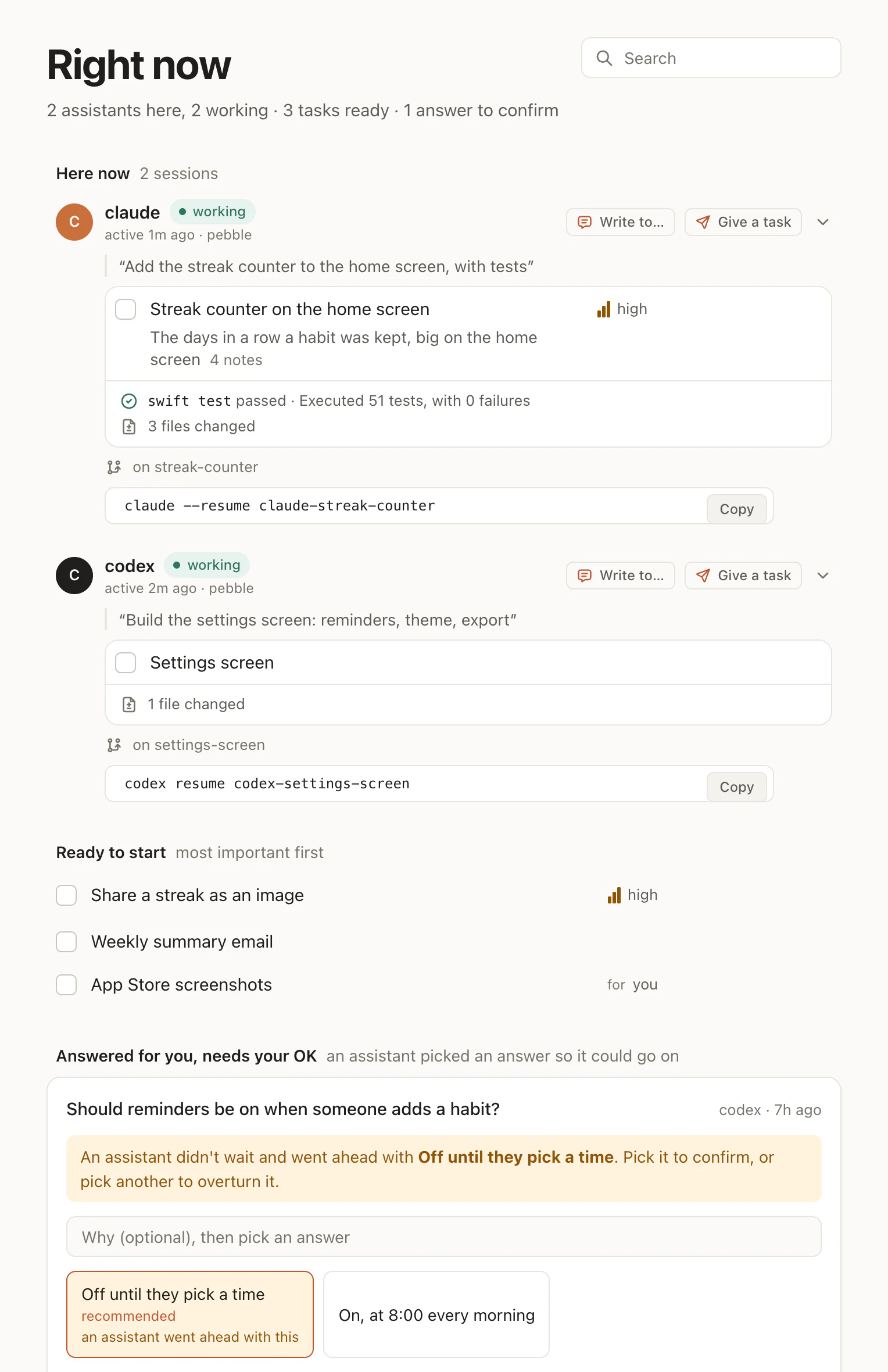
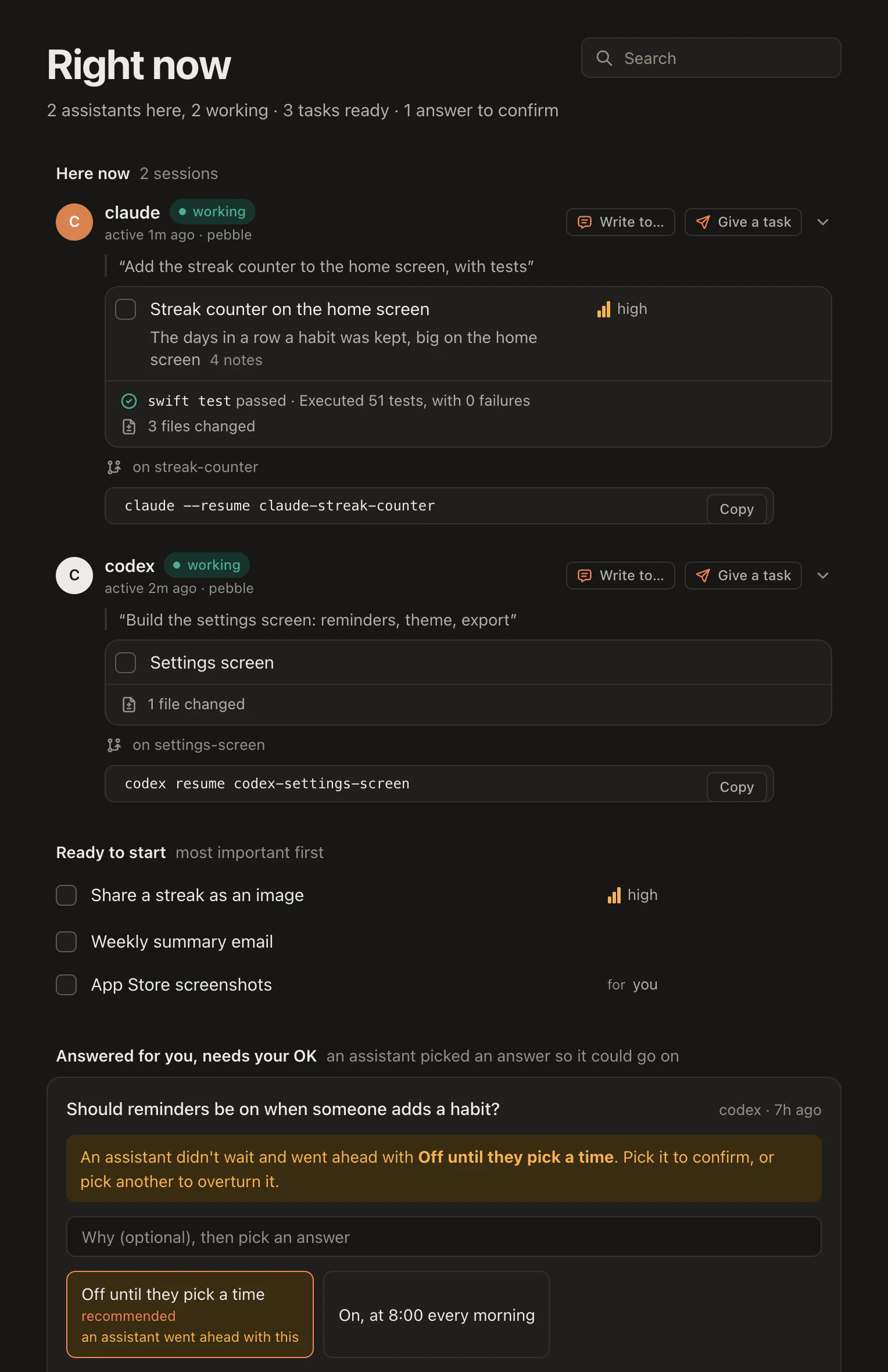
Decisions come to you as questions with options and the one the agent
recommends; what only you can do comes as a request with the steps. The
agents claim the task they take and message each other, so the page is right
without you keeping it, and the hamloy program follows each task through
git (questions, claims, git).
Best for anyone who wants to know where their agents' work stands without reading every terminal, from one agent across many sessions to several agents and a team. Not for you if you want it open source, offline or in the repo. Free for one project; Pro is €8 a month, a team €8 a person (pricing).
A TODO.md: for a checklist in the repo
A checklist in the repo. Free, offline, reviewed with the code, readable by any agent. Each branch has its own copy and the file doesn't say who is on a line, so with several sessions it stops showing where things stand. Best for a checklist that lives with the code, read while you watch. Hamloy vs a TODO.md.
Claude Code's task list: for the steps of one task
Claude Code's built-in TaskCreate, TaskList and TaskUpdate keep a checklist on your computer, shared between Claude Code sessions that set the same list ID. On newer models the tools are off unless you turn them on (tools reference). Experimental agent teams claim tasks with file locking inside one session. Best for keeping one session on track; it fits inside any of the others. Hamloy vs Claude Code's own to-do list.
Beads: for an open-source issue graph in the repo
A "distributed graph issue tracker for AI agents, powered by Dolt", driven by
the bd command line: atomic claims, dependencies between issues, bd ready for
what's unblocked, and issues labelled for a human
(Beads). No board of its own.
Best for people who want everything local, open and scriptable.
Hamloy vs Beads.
Ticks: for a tracker in the repo that also runs your agents
"The issue tracker your AI agents run on": one JSON file per task in the
repo, driven by the tk command line, with tk ready and tk next for what's
unblocked, an owner on each task, and tasks that wait on you for an approval
or an answer (Ticks). Its skill for Claude Code and Codex
splits an epic into waves and runs one agent per ready task, each in its own
worktree; tk board serves a board on your own computer. MIT.
Best for people who want the tasks in git and a tool that runs the agents
for them. Hamloy vs Ticks.
Task Master: for turning a spec into a plan
Reads a PRD and writes tasks with dependencies and subtasks, using a model it
calls with your key or through Claude Code or Codex signed in; keeps them in
.taskmaster/tasks/tasks.json
(Task Master).
Best for starting a project from a written spec with one agent working
through it. Hamloy vs Task Master.
Backlog.md: for Markdown tasks with a board in the terminal
Every task is a plain Markdown file in the repo. backlog board draws a board
in the terminal and backlog browser serves one on your own machine; agents
use it through the command line or MCP, and its setup can configure Claude
Code, Codex, Gemini CLI, Kiro or Cursor. MIT
(Backlog.md). Its README advises one
task per agent session rather than describing claims. Best for people who
want a board but want the tasks to stay files in git.
GitHub Issues: for a repo's public record
Free with every repository, with sub-issues, dependencies and Projects, and closed by the pull request that fixes it. Assign an issue to Copilot, Claude or Codex and it comes back as a draft pull request, on paid Copilot plans (GitHub Issues). Best for open source, bug reports and anything contributors should see. Hamloy vs GitHub Issues.
Linear: for a team planning a product
"The product development system for teams and agents": issues, projects, cycles and triage, an MCP server, and agents such as Codex, Cursor and Devin you delegate an issue to (Linear). Free up to 250 issues. Best for teams whose plan of record lives in a tracker. Hamloy vs Linear.
Which to pick
- Only a checklist for the session you're watching: a TODO.md or Claude Code's own list.
- You want it open source and in the repo: Beads or Ticks, or Backlog.md for plain Markdown files.
- You start from a spec: Task Master.
- You want the tool to run your agents in parallel from the plan: Ticks.
- A team's plan, or a public project: Linear or GitHub Issues.
- You want one page that shows what your agents are on, what they finished and what waits on you, from one session to a team, and brings you the decisions: Hamloy, often beside Linear or GitHub Issues rather than instead of them.
Questions
Which is best if I run one agent at a time?
Hamloy, if you want the overview: what your agent did while you were away, what it ruled out and what waits on you, kept after the session ends, so tomorrow's session starts where today's stopped. Free for one project. If all you want is a checklist for the session you're watching, a TODO.md or Claude Code's own task list is free and needs nothing else.
Which ones show me every agent's work in one place?
Hamloy shows every session of every tool on one live board, with who is on what and what waits on you, in views you arrange yourself. GitHub Projects shows a repo's issues as a table, a board or a roadmap, and Linear has apps for the browser, desktop and phone. Backlog.md and Ticks draw a board on your own machine. Beads, Task Master and a TODO.md are read in the terminal or as a file.
In which ones does an agent claim its task?
Hamloy (claims across tools and machines, shown on the board), Beads (an atomic claim in its command line) and Claude Code's agent teams (file locking, inside one session). Ticks gives each task an owner. The others we read don't describe a claim.
Which ones are open source?
Beads, Ticks and Backlog.md (MIT), and Task Master (MIT with Commons Clause). Hamloy, Linear and GitHub are hosted products.
Why is Hamloy on its own list?
Because we make it, and it's a real choice for the same job. Every other entry was read from its own site, on 10 October 2026 and Ticks on 29 October, and each says when it is the better pick.